Keyboard choice affects daily computer use more than most people initially consider, given how many hours a typical keyboard sees over its lifespan. Understanding the real differences between mechanical and membrane keyboards helps match the right type to your specific typing habits and environment.
Membrane Keyboard Improvements Worth Knowing About
Not all membrane keyboards are created equal, and higher-quality membrane keyboards with better rubber dome materials and more consistent key spacing can feel noticeably better than a bargain-bin option, even while remaining considerably cheaper than a mechanical keyboard. It’s worth reading reviews for a specific membrane model rather than assuming all membrane keyboards perform identically, since quality does vary meaningfully within this category too.
How Membrane Keyboards Work
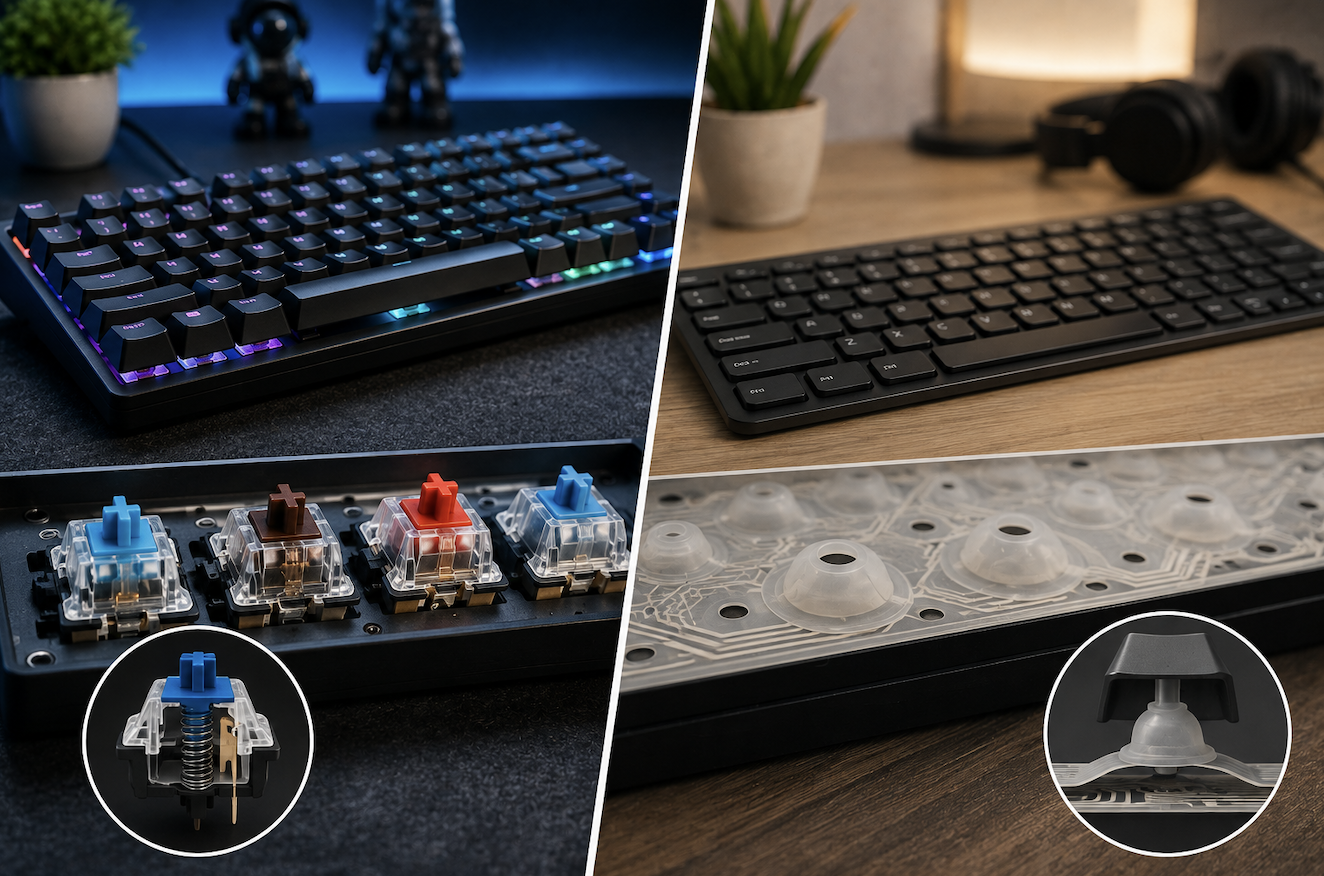
Membrane keyboards use a rubber dome layer beneath the keys, which compresses to complete an electrical circuit when pressed. This design is simpler and less expensive to manufacture, resulting in the lower price point common with most membrane keyboards, including the majority of keyboards bundled with pre-built desktop computers.
Wireless vs Wired Mechanical Keyboards
Mechanical keyboards are increasingly available in wireless versions, though wireless mechanical keyboards can introduce a very small amount of input latency compared to a wired connection, which matters mainly for competitive gaming rather than everyday typing or productivity use. For most non-competitive use cases, a quality wireless mechanical keyboard performs indistinguishably from its wired counterpart in daily use.
How Mechanical Keyboards Work
Mechanical keyboards use an individual physical switch under each key, with a spring and separate moving components that register a keypress through a more precise, consistent mechanism than a rubber dome. This individual-switch design is generally more durable and offers more consistent actuation, but at a higher manufacturing cost that’s reflected in the typically higher price compared to membrane keyboards.
Actuation Force and Point Explained
Actuation force refers to how much physical pressure is required to register a keypress, while actuation point refers to how far the key must travel before it registers. Lighter actuation force switches allow faster repeated keypresses with less finger fatigue, which is part of why some competitive gamers specifically favor lighter linear switches, while heavier actuation force can reduce accidental keypresses for typists who tend to rest their fingers on keys between strokes.
Understanding Switch Types: Linear, Tactile, and Clicky
Linear switches move smoothly from top to bottom with no distinct bump or click, offering a consistent, quiet keystroke often preferred for gaming due to their smooth, uninterrupted actuation. Tactile switches include a noticeable bump partway through the keystroke, providing physical feedback that many typists find helpful for touch typing accuracy without being as loud as clicky switches. Clicky switches combine the tactile bump with an audible click sound, offering the most pronounced feedback but also the most noise, making them a less considerate choice in shared or quiet environments.
Keycap Material and Its Effect on Feel
Beyond the switch itself, keycap material affects both feel and sound. PBT plastic keycaps generally feel more textured and resist shine from years of finger oils better than the more common, less expensive ABS plastic keycaps, which tend to develop a slightly glossy sheen on frequently used keys over time. This is a secondary factor worth knowing about but generally less important than switch type when evaluating overall keyboard feel.
Typing Feel: What Actually Differs
Mechanical switches generally offer more consistent actuation force and a more distinct sense of when a keypress has registered, which many people find leads to more accurate, confident typing over time. Membrane keyboards can feel mushier by comparison, since the rubber dome doesn’t provide the same crisp, consistent resistance throughout the keystroke, though modern membrane keyboards have improved considerably from older, lower-quality versions.
Sound Differences and Why They Matter
Beyond feel, mechanical keyboards, particularly with clicky or even tactile switches, produce noticeably more sound than a membrane keyboard’s soft, muted keystrokes. This matters significantly for anyone working in a shared office, an open-plan household, or during video calls where keyboard noise can be distracting or even audible to other call participants.
Durability Comparison
Mechanical switches are generally rated for a significantly higher number of keystrokes before failure compared to the rubber domes in membrane keyboards, which tend to degrade and feel increasingly mushy over time as the rubber material wears down with repeated use. For heavy daily use over several years, this durability difference can be meaningful, though a membrane keyboard used moderately will still typically last several years of normal daily use before needing replacement.
Cost Comparison
Membrane keyboards remain the significantly more budget-friendly option, and the quality gap between a basic and premium membrane keyboard is generally smaller than the equivalent gap in mechanical keyboards. Mechanical keyboards span a wide price range depending on switch quality, build materials, and additional features like customizable lighting or programmable keys, making it possible to find a budget-friendly mechanical option, though even budget mechanical keyboards typically cost more than an equivalent membrane keyboard.
Gaming Considerations
Many gamers prefer mechanical keyboards, particularly with linear switches, for the consistent, predictable actuation that can support faster, more precise input during fast-paced gaming. Features like n-key rollover, which ensures multiple simultaneous keypresses all register correctly, are also more commonly found on mechanical keyboards, which matters for games requiring several simultaneous key inputs.
Typing and Productivity Considerations
For long typing sessions, many people find tactile mechanical switches reduce finger fatigue compared to the more uniform resistance of a membrane keyboard, since the tactile bump provides clear feedback that a keystroke has registered without needing to bottom out the key fully. That said, typing comfort is genuinely subjective, and some people type just as comfortably, or more comfortably, on a quality membrane keyboard.
Custom Keycap Sets and Aesthetic Customization
Beyond hot-swappable switches, the wide availability of aftermarket keycap sets in different colors, materials, and profiles lets mechanical keyboard owners personalize both the look and, to some degree, the feel of their keyboard without replacing the entire unit. This aftermarket ecosystem is considerably more developed for mechanical keyboards than for membrane keyboards, where keycap replacement is less commonly supported.
Customization and Hot-Swappable Switches
Many modern mechanical keyboards support hot-swappable switches, allowing individual switches to be changed without soldering, letting users experiment with different switch types or replace a single failed switch without replacing the entire keyboard. This level of customization isn’t available on membrane keyboards, where the rubber dome layer functions as a single integrated unit rather than individually replaceable components.
Noise Considerations for Shared Spaces
For anyone in a shared office, apartment, or household with a nearby sleeping area, choosing a membrane keyboard, or a mechanical keyboard specifically with linear or quieter tactile switches combined with sound-dampening switch modifications, meaningfully reduces the noise impact on people nearby compared to a standard clicky mechanical keyboard.
Portable and Compact Mechanical Keyboards
For anyone working across multiple locations, compact mechanical keyboards with fewer keys (omitting the number pad or navigation cluster) offer a smaller footprint that’s more practical to transport than a full-sized board, while still preserving the core mechanical switch experience discussed throughout this guide.
Ergonomic Keyboard Options
Both mechanical and membrane keyboards are available in ergonomic, split, or curved designs aimed at reducing wrist strain during extended use. The switch type debate is largely independent of ergonomic design, so choosing an ergonomic layout doesn’t require sacrificing a preference for either mechanical or membrane switches.
Keyboard Layouts Beyond Standard Full-Size
Beyond the compact options discussed above, tenkeyless (TKL) keyboards remove just the number pad while keeping the rest of a standard layout intact, offering a middle ground between a full-size board and the smallest compact layouts, which some users find strips away too many keys they actually use regularly.
Cleaning and Maintenance
Membrane keyboards are generally easier to wipe down and clean on the surface but harder to clean thoroughly underneath the keys without full disassembly. Mechanical keyboards, particularly with removable keycaps, allow more thorough cleaning between and under individual keys, though the increased number of small components also means more crevices where dust and debris can accumulate over time if not cleaned periodically.
Trying Before Buying Where Possible
Since switch feel is genuinely subjective, testing different switch types in person at a store, or trying a switch tester (a small device with several switch samples mounted for hands-on comparison), gives a far more reliable sense of personal preference than reading descriptions alone, particularly for anyone new to mechanical keyboards trying to decide between linear, tactile, and clicky options.
Switch Lubrication for Smoother Feel
Enthusiast mechanical keyboard users sometimes apply specialized lubricant directly to individual switches to reduce scratchiness and improve overall smoothness, a level of customization entirely unavailable with sealed membrane keyboards. This is a more advanced, optional step rather than a necessary one for most users, but illustrates just how far mechanical keyboard customization can extend for those interested in it.
Common Keyboard Buying Mistakes
Buying a mechanical keyboard with clicky switches for a shared office environment without considering the noise impact on coworkers is a common and easily avoidable mistake. Assuming all mechanical keyboards feel and sound the same, without researching the specific switch type included, is another common issue, since switch type affects the experience far more than the broad mechanical-versus-membrane category alone.
The Bottom Line
Mechanical keyboards generally offer more durability, customization, and a more precise typing feel, making them worth the higher cost for gaming, heavy daily typing, or anyone who values tactile feedback. Membrane keyboards remain a perfectly reasonable, budget-friendly choice for casual use, shared or noise-sensitive environments, or anyone who simply doesn’t notice or value the differences mechanical keyboards offer.
- Read more about Technewweb