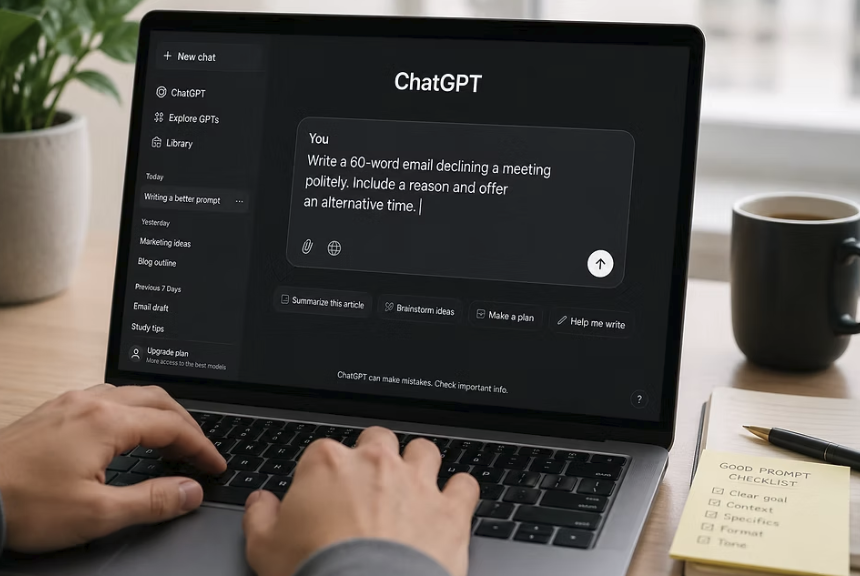
AI chat assistants can draft emails, plan meals, explain bills and summarize long documents, but the quality of what you get back depends heavily on what you ask. Many people type a short, vague request, receive a bland answer and decide the tool is not much use.
In this article we will explore a practical way to write prompts, covering goals, context, examples, step-by-step requests, follow-up messages, checking habits and ready-to-use patterns for common jobs around the home, school and office.
Clear prompts start with a specific goal
The most common reason for a disappointing answer is that the request leaves too much open. A message such as “write something about healthy eating” could lead to an essay, a poem, a shopping list or a lecture. The assistant must choose, and it will usually choose the most generic option. Before you type, spend ten seconds asking yourself what you will do with the answer, because the purpose tells you what to include.
A useful way to sharpen a request is to state the task in one plain sentence that starts with a verb. “Write a polite email asking my landlord to fix a leaking tap” is far clearer than “help with a landlord thing.” Add the result you want, such as a draft, a list, a comparison or an explanation. If you are unsure what you want, say that too, and ask the assistant to suggest two or three approaches before it writes anything.
Specific limits help as much as specific goals. Tell the assistant how long the reply should be, what reading level suits your audience and which points must be included. For example, “keep it under 150 words, friendly but firm, and mention that I first reported the leak two weeks ago” gives the model plenty to work with. Without limits, assistants tend to produce long replies padded with general remarks, which cost you time to read and edit.
It also helps to say what you do not want. If you have tried a suggestion already, or you dislike a certain style, mention it directly. “Avoid jargon and do not suggest paid apps” removes a whole category of unhelpful answers in one line. Negative limits are especially handy for tone, such as asking for no exaggerated enthusiasm or no corporate buzzwords.
Finally, keep one main task per message when you can. A request that mixes writing an email, planning a trip and fixing a spreadsheet formula leads to muddled output. Several small, focused prompts usually give cleaner results than one giant prompt. If the tasks truly belong together, number them so the assistant can address each in turn.
A quick self-test can show whether a prompt is ready to send. Imagine handing the same message to a capable human assistant who has never met you. Would they know what to produce, for whom, and roughly how long it should be? If the honest answer is no, add the missing piece before you press enter, because the model faces exactly the same gap.
Context and audience shape the quality of the answer

An assistant knows nothing about your life beyond what you put into the conversation. It cannot see your kitchen, your budget, your boss or your skill level unless you tell it. Adding a few lines of background can change a generic answer into a usable one. Think of how you would brief a helpful stranger who has just walked into the room: they would need to know the situation, the people involved and what you are trying to achieve.
Start with who the answer is for. An explanation of how a router works will look very different for a ten-year-old, a retired neighbor and a colleague in IT. Saying “explain this to someone who has never configured a network” sets the level and the vocabulary at once. You can also ask the assistant to take a role, such as a patient tutor or a careful editor, which often steers tone and structure in a helpful direction.
Next, give the facts that matter. If you want a meal plan, mention the number of people, the foods you avoid for any reason, the time you have to cook and the equipment in your kitchen. If you want help with a complaint letter, include the dates, amounts and what the company has already said. The assistant can only use details you supply, and it will fill gaps with guesses when you leave them out, which is where mistakes creep in.
When you have source material, paste it in and say how to use it. “Using only the text below, list the three deadlines and who is responsible for each” is more reliable than asking the assistant to remember the facts from its training. Mark the pasted text clearly, for example by placing it between lines of dashes or under a label such as “Notes”. This also reduces the risk that the assistant mixes your material with outside information.
Be careful about what you share while giving context. Replace real names, addresses, account numbers and anything confidential with simple placeholders such as “Customer A” or “my employer.” You can swap the real details back in yourself afterward. This keeps the helpful structure of the situation while protecting private information.
A few extra details are worth adding when they apply. Mention the deadline if time is short, since that can change whether a quick fix or a thorough plan is the better answer. Mention any strong preferences, such as a favorite style of writing or a tool you already own. Mention what has already gone wrong, such as an error message you saw or a reply the other person sent. Each of these narrows the field and makes the answer more specific to you.
Examples and formats tell the model what finished work looks like
Describing a style in words is hard, and showing it is easy. If you like a certain layout for meeting notes or a certain voice for social posts, paste a short sample and ask the assistant to follow the pattern. This approach is often called few-shot prompting, and it works because the model is skilled at continuing patterns. One or two good examples can do more than a paragraph of instructions.
When you give an example, say what to copy and what to change. “Match the tone and length of the sample below, but write about our spring plant sale instead” is clear. If you want the structure but not the wording, say that as well, so the assistant does not repeat phrases from your sample. Keep examples short, since a long sample uses up room in the context window and may distract from the task.
You can also name the output format directly. Ask for a table with specific columns, a numbered list of steps, a short email with a subject line, or a summary in three sentences. If you plan to paste the answer into a spreadsheet or document, ask for a format that will carry over cleanly, such as comma-separated values or plain text with no extra commentary. Clear formats save the editing work that otherwise follows.
Templates are a good use of this idea. If you write similar messages every week, such as a status update or a reply to customers, build one prompt with blanks for the changing details and save it in a notes app. Next time, you fill in the blanks and send. This turns a one-off trick into a repeatable routine and keeps the quality steady from week to week.
When the assistant misses the format, point to the exact problem instead of repeating the entire request. “Put the dates in the first column and remove the introduction” is quicker and clearer than starting over. Most assistants handle this kind of precise correction well. If a particular instruction keeps being ignored, move it to the start or end of the message and write it in a short, direct sentence.
Lists and labels make long prompts easier for the assistant to follow. If you have several requirements, put each on its own line instead of burying them in one long sentence. Use simple labels such as “Task”, “Background”, “Rules” and “Output” to separate the parts. This also makes your own prompt easier to edit later, because you can change one line without rewriting everything.
Step-by-step requests work better than one giant demand

Complex tasks often go wrong when they are packed into a single instruction. Breaking the work into stages gives you a chance to steer, and it gives the assistant a clearer path. For a trip plan, you might first ask for a list of areas to stay in, then for a rough daily outline, and finally for a packing list. Each stage builds on the last, and you can correct course early instead of discovering a flaw at the end.
You can also ask the assistant to work through a problem in steps. For reasoning tasks such as comparing two phone plans or checking a budget, a request like “list your assumptions, show the calculation step by step and then give a short conclusion” makes the logic visible. Seeing the steps lets you spot an incorrect assumption or a slip in arithmetic. It is much easier to fix a wrong step than to guess why a final answer looks odd.
Another useful pattern is to ask questions before the work starts. Try “Before you write the plan, ask me up to five questions that would help you tailor it.” The assistant will request the missing details, and your answers become the context it needed in the first place. This is especially valuable for open-ended jobs like writing a speech, planning a budget or preparing for a job interview.
A short checklist can help you build the stages. First, name the end goal in one sentence. Second, list the pieces that must be produced, such as an outline, a draft and a final edit. Third, decide which pieces you want to review before the next begins. Fourth, tell the assistant the order and ask it to pause for your feedback after each stage.
For long documents, work in sections. Ask for a summary of each part, then a summary of those summaries, instead of pasting everything and asking for one answer. Chunking also protects you from the limits of the context window, since each piece is small enough to be handled well. When you need details to be accurate, return to the original passage and ask for a direct quotation.
Sometimes it helps to ask for a plan before the finished work. A message such as “Outline how you would approach this in four bullet points, and wait for my approval” lets you catch a wrong direction cheaply. Once you approve the outline, ask for the full version. This extra step takes half a minute and often saves several rounds of correction.
Follow-up messages refine a draft faster than starting over
Few first replies are perfect, and that is normal. The strength of a chat tool is that you can respond, which lets you shape the result in a few quick turns. Read the draft, decide what is closest to right, and tell the assistant exactly what to keep and what to change. “Keep the second paragraph, make the opening warmer and cut the last sentence” is a typical good follow-up.
Be concrete about the adjustment. Words like “better” or “more professional” leave room for guessing, while “shorter, with no exclamation marks and a clear request in the first line” does not. If a reply is too long, give a target such as half the length. If it is too stiff, ask for a more conversational voice and supply a sentence or two in your own words as a guide.
Ask for alternatives when you are not sure. A prompt such as “give me three different openings for this letter, one formal, one friendly and one brief” lets you compare options quickly. You can then combine the best parts or ask the assistant to expand one. This is faster than trying to describe the perfect version from the start.
Use the assistant to critique its own work or yours. Questions like “What is unclear in this paragraph?” or “Which claim here would a skeptical reader challenge?” can reveal weak spots. You can also ask it to check whether the draft followed each of your original instructions. Keep in mind that its critique is another piece of generated text, so treat it as a prompt for your own judgment.
Know when to begin again. After many rounds of edits, a conversation can become cluttered with old instructions that conflict with each other, and the assistant may start to drift. If answers get worse, start a fresh chat and paste a short summary of the best version and your latest requirements. A clean start often fixes problems that more corrections would not.
If your assistant offers memory or custom instruction settings, use them sparingly. A short note about your preferred spelling, tone and reading level can save repeating yourself in every chat. Avoid putting sensitive personal details there, and review the entries from time to time so that old preferences do not shape new answers in ways you no longer want. Settings and names for these features differ between products, so check what your own tool offers.
Everyday tasks each need a slightly different approach

The same basic habits apply everywhere, but each type of job has its own sensible details. Writing tasks need the audience, tone and length, while explaining tasks need your current level and what confuses you. Planning tasks need constraints such as time, money and people involved. Analysis tasks need the data supplied directly. The table below gathers patterns you can adapt.
| Everyday task | What to include in the prompt | Example of a useful request |
| Writing an email | Recipient, purpose, tone, key facts, length | “Draft a polite 120-word email to my tenants about a planned water shutoff, with the date and a thank-you.” |
| Summarizing a document | Pasted text, who it is for, number of points | “Summarize the notes below in five plain-language points for a busy manager, and list any deadlines.” |
| Learning a topic | Your level, what you already know, preferred style | “Explain how interest on a savings account works as if I know nothing, then give a small example.” |
| Planning a week | Time available, budget, preferences, fixed commitments | “Plan four weeknight dinners for two people, under thirty minutes each, with no shellfish.” |
| Comparing options | The options, the criteria, the format | “Compare these two laptops for student use in a table covering weight, battery life and repairability.” |
| Editing your writing | Your draft, the goals, what to leave alone | “Tighten this paragraph without changing my meaning or adding new claims, and mark each change.” |
Notice that every example has a clear audience, limits and a defined output. Even when you are not sure what a perfect prompt looks like, you can follow this skeleton: task, context, constraints, format. Write those four items in a short message and you will be ahead of most first attempts. Add an example or a pasted source when you can.
The skeleton is short enough to memorize, so you can use it on a phone while waiting in line. Over time you will add your own favorite details, such as a preferred tone or a standing rule about avoiding jargon. Saved prompts also make it easy to share a good approach with a friend or coworker.
Some tasks deserve extra care. For questions about health, money, legal rights or safety, use the assistant to get general background, to organize your questions or to prepare for an appointment. Do not rely on it for a diagnosis, a tax decision or a legal strategy. If a symptom worries you, or a decision has serious consequences, speak with a doctor, accountant, lawyer or other qualified professional.
Creative tasks are a good place to experiment, because mistakes cost little. Ask for ten gift ideas for a coworker who likes gardening, a story for a bedtime routine, or names for a small business. Treat the output as raw material and keep the ideas you like. For anything you plan to publish or sell, edit heavily and make sure the final work reflects your own voice and judgment.
Learning tasks reward a back-and-forth style. After an explanation, ask the assistant to quiz you with three short questions, then to correct your answers kindly. Ask for a simple analogy if a term still feels slippery, and for a worked example with real numbers. Because the tool never tires of repeating itself, you can keep asking until the idea clicks, while still checking key facts against a textbook or other reliable reference.
Checking and safety habits keep answers trustworthy

An assistant can write fluent text that is wrong, and it does this without any warning. The risk is highest for exact figures, dates, quotations, references and recent events. Make a habit of scanning each answer for these items and confirming the important ones in an original or official source. If the assistant gives a reference, find the real document yourself instead of trusting the citation as written.
You can build checking into the prompt. Ask the assistant to separate facts you supplied from assumptions it made, to flag anything it is unsure about, and to say “not stated” when the answer is missing from your text. Ask it to quote the line that supports a claim. These steps do not make the answer perfect, but they make weak points easier to see.
Test the answer against your own knowledge. If a suggestion sounds too convenient, ask for the reasoning or the downsides. Ask the same question in a second chat and compare the replies; large disagreements are a warning sign. For calculations, repeat the sum with a calculator or spreadsheet, since language models are not built for exact arithmetic.
Protect your privacy as you go. Keep passwords, full card numbers, government identification numbers, private medical details and confidential workplace documents out of the chat unless your employer or provider has approved the tool for that purpose. Policies on data storage and use differ by service, plan and country, so read the settings and privacy notice. When in doubt, use placeholders and leave out anything you would not want to see on a shared screen.
Finally, take responsibility for what you send or submit. If a school, employer or publisher has rules about using AI help, follow them and be open about it where required. Read the whole text before sending it, because small errors such as a wrong name or an invented detail can damage trust. The assistant is a helper, and the final decision always belongs to you.
Conclusion
Pick one task from this week that you would normally do by hand, such as a message you have been avoiding or a set of notes that needs tidying. Write a prompt with four parts: the task, the background, the limits and the format you want. Paste any source text you have, and replace private details with placeholders. Then read the reply with a pencil in hand, marking anything that needs checking.
Next, use two or three follow-up messages to improve the draft. Tell the assistant what to keep, what to cut and what tone you prefer. If it misses the point, rewrite the first line of your original request to be clearer instead of adding more words around the problem. After the second or third round, compare the result with what you would have written alone and note which parts saved time.
Keep your expectations realistic along the way. A weak result often points to a missing detail in the prompt, and the fix may take only a sentence, so do not judge the tool by a single try. If three careful attempts still fail, the task may simply be a poor fit, and a search engine, a reference book or a person may serve you better.
Then save what worked. Keep a small notes file with three or four prompts you can reuse, each with blanks for the details that change. Include a line that asks the assistant to list its assumptions and flag any uncertainty. Over a few weeks, this personal collection will become a quick way to get dependable results with less effort.
Last, set your own rules for safe use. Decide which kinds of information you will never paste, which tasks you will always double-check, and which topics you will take to a professional instead. Revisit these rules when you try a new tool, since each service handles data differently. With a clear request, relevant background and a habit of checking, everyday AI help becomes far more useful and far less frustrating.
Read more about TechNewWeb