A password alone, no matter how strong, remains vulnerable if it’s ever leaked in a data breach or guessed through other means. Two-factor authentication (2FA) adds a second, independent verification step that significantly reduces this risk, and setting it up across your important accounts is one of the highest-value security steps most people haven’t gotten around to yet.
How Two-Factor Authentication Stops Real Attacks
Large-scale data breaches happen regularly across many online services, and the leaked passwords from these breaches often get tested automatically against other accounts using the same or similar passwords, an approach called credential stuffing. Two-factor authentication breaks this specific attack pattern, since a correct leaked password alone no longer grants access without also providing the second verification step tied specifically to that account.
Why Two-Factor Authentication Matters
Even a strong, unique password can be exposed through a data breach on a service you use, and without 2FA, that exposed password alone is often enough for someone to access your account directly. With 2FA enabled, a leaked password alone isn’t sufficient, since the attacker would also need access to your second verification method, which is significantly harder to obtain remotely.
Push Notification Approval as a Fourth Option
Some services offer push notification-based approval, sending a prompt directly to a trusted, already-logged-in device asking you to approve or deny a new login attempt. This is generally more convenient than manually entering a code and offers similar security benefits to an authenticator app, though it’s worth being cautious of “MFA fatigue” attacks, where an attacker repeatedly sends approval requests hoping you’ll approve one by mistake or out of habit always deny any request you didn’t personally initiate.
The Main Types of Two-Factor Authentication
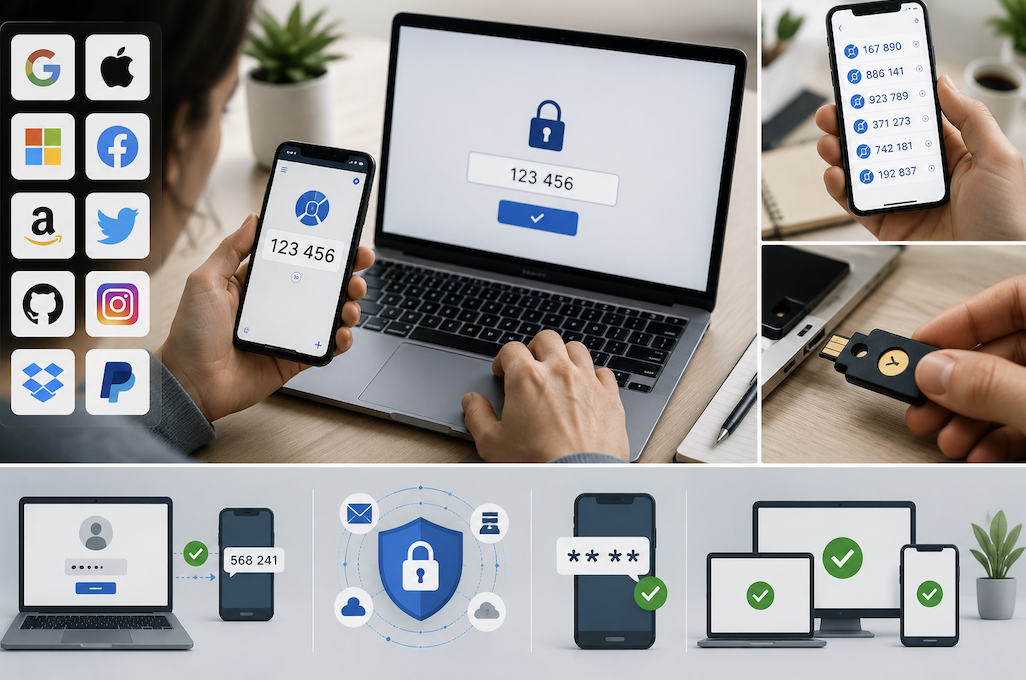
SMS text message codes remain common and are better than no 2FA at all, but are considered the weakest form of two-factor authentication. Authenticator apps generate time-based codes directly on your device without relying on your phone carrier, offering meaningfully stronger security than SMS.
Hardware security keys, small physical devices you plug in or tap to verify, offer the strongest protection currently available for most consumer use cases. Biometric verification, like a fingerprint or face scan, is commonly used as a convenient local unlock method but functions somewhat differently from the account-level verification methods above.
Why SMS Is the Weakest Option
SMS-based codes are vulnerable to a specific attack called SIM swapping, where an attacker convinces a mobile carrier to transfer your phone number to a device they control, allowing them to intercept your verification codes directly. While this attack requires some effort and isn’t extremely common, it’s a real, documented risk that authenticator apps and hardware keys aren’t vulnerable to in the same way, since they don’t rely on your phone carrier at all.
Understanding Time-Based Codes and Clock Sync
Authenticator app codes are time-based, meaning they’re calculated using both a shared secret established during setup and the current time, refreshing automatically every 30 seconds. If a code consistently doesn’t work despite being entered correctly, checking that your phone’s clock is set to automatic, accurate time (rather than manually set and potentially drifted) resolves this specific, relatively common issue.
Setting Up an Authenticator App
Most services offering 2FA provide a QR code during setup, which you scan using an authenticator app installed on your phone, linking that account to the app permanently. Once linked, the app generates a new, temporary code every 30 seconds, which you enter alongside your password when logging in, without requiring any cell signal or SMS delivery.
The Critical Importance of Backup Codes
When setting up 2FA, most services provide a set of one-time backup codes specifically for the scenario where you lose access to your authenticator app or device. Saving these codes somewhere secure and separate from your phone, not just a screenshot on the same device, is one of the most commonly skipped steps, and skipping it can mean permanent lockout from an account if your phone is lost, damaged, or reset without the app’s data being transferred first.
Where to Start: Email First
Your email account is typically used to reset passwords for most of your other accounts, making it the single most important account to secure with 2FA first. If an attacker gains access to your email without 2FA protecting it, they can often use password reset requests to cascade into your other accounts, even ones that individually have strong passwords.
Setting Up 2FA on Shopping and Payment Accounts
Accounts with stored payment information, including online shopping and payment service accounts, represent a direct financial risk similar to banking accounts if compromised. These are often overlooked in favor of more obviously “important” accounts like email and banking, but deserve the same level of protection given the stored payment details and purchase history they typically contain.
Setting Up 2FA on Banking and Financial Accounts
Most banks and financial institutions offer 2FA, and given the direct financial risk involved, this is worth prioritizing immediately after email. Some financial institutions have started supporting authenticator apps or hardware keys in addition to SMS, and choosing the stronger option where available, rather than defaulting to SMS purely because it’s the default option presented, is worth the extra setup step.
Setting Up 2FA on Work and Professional Accounts
Work email and business tool accounts often hold sensitive company data and, similar to personal email, can serve as a gateway to resetting access on other connected business systems. Many employers require 2FA on work accounts already, but for anyone with the option to enable it voluntarily, doing so protects both personal professional standing and the broader organization’s security.
Setting Up 2FA on Social Media Accounts
Social media accounts are frequently targeted specifically because they can be used to impersonate you or spread scams to your contacts once compromised, beyond just the direct value of the account itself. Enabling 2FA here protects both your own account and, indirectly, the people in your network who might otherwise trust a message coming from your compromised account.
Understanding the Limits of Two-Factor Authentication
While significantly more secure than a password alone, 2FA isn’t an absolute guarantee against every possible attack sophisticated phishing techniques can sometimes trick users into entering both their password and a current 2FA code on a fake site in real time. This is part of why hardware security keys, discussed next, offer an additional layer of protection specifically against this more advanced phishing scenario that standard authenticator app codes don’t fully address.
Hardware Security Keys: Worth the Investment?
Hardware security keys offer the strongest available protection against phishing specifically, since they cryptographically verify the actual website you’re logging into, rather than just accepting whatever code you enter, which is not something SMS or authenticator apps inherently protect against. For most personal use, an authenticator app provides strong, sufficient protection, but anyone with particularly high-value accounts, or a specific concern about targeted phishing attempts, may find the additional cost of a hardware key worthwhile.
Recovering Access If You Lose Your Backup Codes Too
If you’ve lost both your authenticator device and your backup codes, most services offer an account recovery process, though it’s typically slower and more involved than a standard login, often requiring identity verification through other means. This process exists specifically to prevent 2FA from becoming a permanent lockout mechanism, but avoiding needing it in the first place, by reliably storing backup codes as discussed earlier, remains far preferable to relying on account recovery.
Planning for Device Loss or Replacement
Before getting a new phone, transferring your authenticator app’s accounts to the new device, generally through the app’s built-in transfer or backup feature, prevents being locked out of every linked account simultaneously. If you lose a phone without having transferred or backed up your authenticator accounts beforehand, your saved backup codes become the only way back into those accounts, reinforcing why saving them securely matters so much.
Using a Password Manager Alongside 2FA
Many password managers now include built-in authenticator functionality, storing both your password and your 2FA codes in one place. This offers convenience but does concentrate more security dependency into a single tool, so it’s worth ensuring that the password manager itself is protected with a strong master password and its own separate 2FA method where supported, rather than becoming a single point of failure for everything else.
Explaining 2FA to Less Tech-Savvy Family Members
Helping less tech-savvy family members set up 2FA on their own important accounts, particularly email and banking, extends this same protection to people who might otherwise never set it up independently. Walking through the setup together once, rather than just explaining it verbally, makes it far more likely the setup is completed correctly, and the backup codes are actually saved somewhere secure, rather than skipped due to unfamiliarity with the process.
Auditing Your Accounts Periodically
Setting a recurring reminder every six months or so to review which accounts have 2FA enabled, and adding it to any newly created or previously overlooked accounts, keeps your overall security posture current as you accumulate new accounts over time, rather than only addressing 2FA setup once and never revisiting it.
Common Two-Factor Authentication Mistakes
Not saving backup codes is the most common and most consequential mistake, directly leading to permanent account lockouts that are often difficult or impossible to resolve without extensive account recovery processes. Enabling 2FA only on a few accounts while leaving others, particularly less obviously sensitive ones, unprotected is another common gap, even though many of those “less sensitive” accounts can still be used as a stepping stone to more important ones.
Conclusion
Two-factor authentication meaningfully reduces the risk of account compromise, and prioritizing email first, followed by financial and social accounts, covers the highest-impact accounts quickly. Choosing an authenticator app over SMS where available, and reliably saving backup codes somewhere secure and separate from your phone, are the two adjustments most likely to prevent both a security incident and an accidental self-inflicted lockout.